
Under Slotbound v1.0.0 (9), Rare units unlock after clearing Stage 2 on Normal. The developer changed this from Stage 3 on Easy. If you found an older route, check its date before spending time on the wrong clear.
Unlocking access and actually summoning a Rare are different events. Completing a prerequisite does not mean that every following spin will produce the grade you want. Check the upgrade tree and the game’s current odds rather than expecting a guaranteed pull.
The current checklist
- Confirm you are running v1.0.0 (9) or a later version whose notes retain this requirement.
- Select Stage 2 and verify the difficulty is Normal.
- Complete the clear, then inspect the result and progression screens.
- Open the upgrade tree and read the Rare-related node’s current state and any remaining purchase condition.
- In the next run, distinguish available Rare odds from a guaranteed Rare summon.
The patch announcement establishes the changed clear requirement. It does not supply every upgrade-node cost or a complete probability table, so this checklist does not invent those missing values.
Why Stage 3 Easy appears in older guides
It was the previous condition, explicitly identified in the change note. An older guide can accurately describe an older build while giving you the wrong route today. This is a version mismatch rather than evidence that the new unlock is random.
If your installed game still displays the older condition, verify the build and update state. Do not assume that reading a new announcement means the application currently running has already been updated. Save or exit through the normal game interface before checking the installed version.
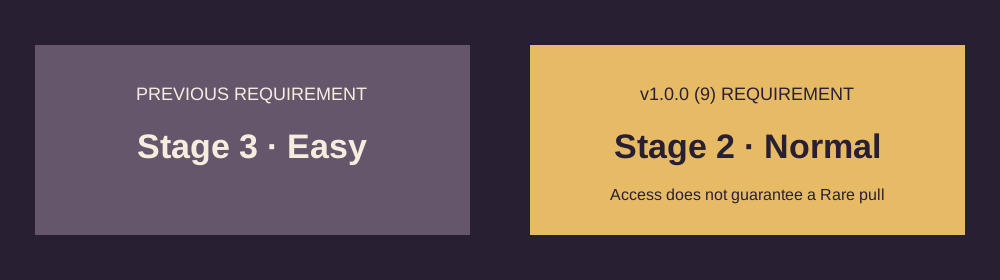
A clear requirement is not a drop-rate guarantee
Check access first, then look at the odds in the run. A prerequisite can make a system available, while the subsequent summon still depends on the game’s displayed rules. A string of non-Rare summons is not enough by itself to prove that the unlock failed.
First inspect the relevant upgrade state. If a node has an additional purchase or research step, read it rather than assuming a stage clear completed every action automatically. Then check the odds actually displayed in the run. Only after those checks does it make sense to investigate an apparent mismatch.
Do not borrow percentages from a creator with different progression. Their unlocks and effects may differ from yours. A video with repeated Rare pulls is useful footage of that run, not a promise of the same sequence on your account.
Prepare the army for the required clear
The goal is a specific stage and difficulty clear, so choose decisions that help the present army complete it. Avoid building a plan that requires the very Rare unit you are trying to unlock. Develop available starters, inspect promotions and preserve the roles that keep the army functional.
The beginner guide covers that preparation loop. If the final checkpoint is the problem, use the diagnostic method on the boss page: determine whether survival, finishing damage or a conditional effect is failing before changing the whole build.
If you lose, read the result screen. The latest covered patch changed currency rewards for defeated runs, but the exact outcome should be taken from the game. A partial run can provide some progression without satisfying the clear prerequisite.
If the unlock still looks wrong
Record the build, stage, difficulty, result screen and the Rare node’s text. Those details distinguish a missing prerequisite from an interface or progression problem. A screenshot of a Rare unit in someone else’s video does not establish what your own upgrade tree should show.
Check official resources for the developer’s current notes and discussion channel. Describe the mismatch precisely: the required clear you completed, what the game recorded and what remains locked. Avoid starting a new run solely to test a guess until you have inspected the saved progression state.
Source
The changed requirement comes directly from the official v1.0.0 (9) update. This page is a focused unlock checklist; it does not claim a tested farming route or a guaranteed rarity outcome.
Look up a unit · Plan a build · Check the latest covered patch
Evidence-based editorial guidance. We have not independently play-tested these builds. How we check and update this guide.