
If the Slotbound slot machine is not spinning, check army capacity before assuming the game has frozen. In a Steam discussion about reels shaking red, the accepted answer identified an army over the limit and directed the player to absorb units. That is a documented cause of this symptom, not proof that every refused spin has the same cause.
Work through the visible game state first: capacity, available actions, current cost and unfinished choices. These checks preserve the run and give you a useful description of the problem if it persists.
Start with what still responds
Try opening a unit information panel or the normal game menu. If those controls respond, distinguish a refused action from a completely unresponsive application. A disabled or rejected spin can be the game enforcing a rule while the rest of the interface works normally.
Read any message near the machine or army. Do not focus exclusively on the reel animation. A capacity indication, a cost you cannot meet or a pending choice is more informative than the fact that the board shook.
If the whole application is frozen, stop treating it as a capacity problem. Note what was on screen and whether the game produced an error. The controls and saving guide separates normal run controls from stability issues. Avoid force-closing a responsive game merely because one action was refused.
Check whether the army needs consolidation
The original player report described being unable to spin while the slots shook red. The accepted response said the army was above its limit. Replies discussed using absorption and finding units that overlapped visually in the early demo.
Count units using the game’s current display rather than assuming the limit from an old comment. Capacity can depend on progression. The useful lesson from the thread is to check the actual limit and resolve it; it is not to hard-code an old number into every run.
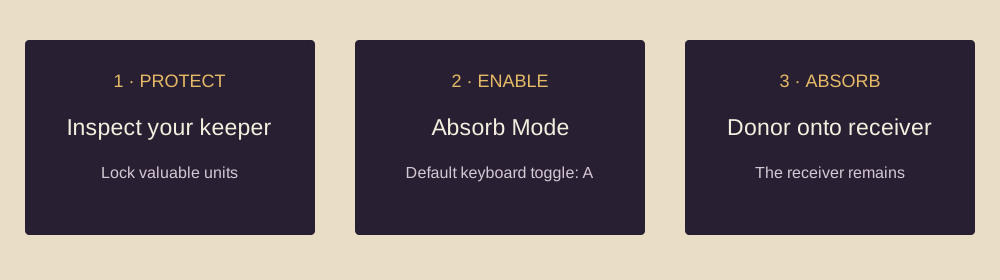
If you need to absorb, choose the receiver first. Protect important units with locks, then consume only a donor whose removal you understand. A panic merge can solve capacity while damaging the army. The absorption walkthrough gives the exact control sequence.
After the action, read the capacity indication again. One absorption may not be enough if several units arrived. Conversely, do not continue consuming units after the warning has cleared just because the first merge helped.
Inspect the available spin and its cost
A visible machine is not a promise that another paid spin is currently available. Look at the remaining actions and the displayed price. Compare that price with your current resource count rather than the cost of the previous spin.
Do not use a Core’s headline discount as a substitute for reading the current cost. An effect may require a trigger that has not occurred, and a reduction does not necessarily make the action affordable. If the price still exceeds the resources shown, the refusal has a straightforward explanation.
The current community machine reference describes a per-wave spin allowance and changing paid-spin costs. This page intentionally does not assume the unmodified numbers apply to every upgraded run. The interface gives you the state that matters for the action you are trying to take.
If an action has been used up for this wave, preparing for the battle may be the next legitimate step. Repeated clicking will not establish that the game owes you another spin. First confirm that the army and any pending choices are ready.
Finish a pending decision
A new summon or absorption can lead to another choice. Check for a promotion or imprint panel that still needs attention. You may be looking at the machine while another part of the interface is waiting for an answer.
Read the options before closing or confirming anything. If a promotion introduces unfamiliar classes, use Collection access to compare them. If an imprint choice asks you to replace an existing effect, check what the receiver would lose.
Once the choice is resolved, return to the ordinary preparation view and try the appropriate control once. If the action succeeds, inspect the result before taking another step. This clean sequence makes it easier to tell whether the issue was an unfinished choice or a different restriction.
Check the control you are using
The developer added Spacebar spinning and the A-key Absorb Mode toggle in v0.3.0. If a keyboard shortcut behaves unexpectedly, use the visible interface control as a comparison and inspect the game’s current Controls menu.
Do not assume a shortcut is still at its default if you have changed bindings. Also check whether another panel has focus. A key used in the main preparation screen may serve a different purpose while a menu is open.
For controller users, the v1.0.0 (9) notes fixed a case where B did not leave the shop or Fate Stone screen immediately after gaining gold. If you are stuck in one of those panels on an older build, compare that known fix with your situation. It is separate from the army-capacity explanation in the old Steam thread.
Separate old bugs from current rules
The early discussion included comments about overlapping units. The developer later improved spawn positions in v0.3.0. That means an old workaround may explain a historical symptom without being the normal instruction for the current release.
Similarly, a gamepad panel-exit fix does not prove that every keyboard refusal is the same bug. Match the report’s version, input method and visible state to yours. Match an old workaround to your version and the screen you are actually stuck on.
Check the update log if the behaviour started after an update or if you have not restarted Steam since installing the game. Confirm the version actually running before spending time on a workaround for a fixed issue.
What to record if the checks fail
Capture the stage, difficulty and wave, the army count and limit, the remaining action display, current resources and spin price, and any open decision panel. Include the input method and exact build version. A screenshot that shows the whole relevant interface is more useful than a cropped red reel.
Describe which other controls still work. “The menu opens and units can be selected, but the spin button rejects the action” is different from “nothing responds.” Note whether you can reproduce the behaviour after resolving capacity and returning to the preparation screen.
Use the official Steam discussion or developer-linked support channel from our resources page. Do not publish private account details or unrelated files in a bug report. If there is an error log, inspect it before sharing it and provide only the relevant diagnostic information.
A short decision checklist
- The army is within its currently displayed limit.
- The attempted action is still available in this wave.
- The displayed cost is affordable.
- No promotion, imprint or other choice remains unresolved.
- You are using the intended control in the correct screen.
- The game version has been checked against relevant fixes.
If one item fails, resolve that item first. If all pass and the action still fails, you now have a specific report rather than a guess. There is no reason to call a confirmed capacity restriction a crash, or an unexplained freeze a capacity restriction.
Sources
The original symptom and accepted capacity explanation are in the Steam thread “bug or im just stupid”. Control and spawn changes are in v0.3.0. Action-limit context is cross-checked against Wikily’s machine reference. Current panel fixes are linked from patch notes.
Look up a unit · Plan a build · Check the latest covered patch
Evidence-based editorial guidance. We have not independently play-tested these builds. How we check and update this guide.